-
Technical questions
Technical questions about Autoplay Menu Designer functionality
You can build two types of a menu :
- Windows executable application - works on any modern Windows system(beginning from Windows XP).
- Web/HTML5 application - works on any device(Windows, MAC, Linux, IOS, Android) that have a browser.
1. If you use the USB device please read the article about an autorun function on USB : Autorun USB in Windows 7/8
2. If you use the CD/DVD disc the base reason that the Autorun/Autoplay function is disabled in Your Windows. Please read :
How to enable or disable AutoPlay in WindowsNo, you can't. In the latest versions of Microsoft Windows the autorun menu cannot be run automatically. System autoplay message box will be displayed instead. User can run autorun menu from it.
There are two ways to play videos :
1. Using an embedded video player. In this case to play videos the AutoPlay Menu Designer uses a Windows Media Player control.
2. Using the "Run/Open a file" action. In this case will be used an external video player by default on the target PC.
In both cases if the target PC will not have an appropriate codec the video will not be playing. File types supported by Windows Media Player (the default video player in Windows) you can see here.
Therefore we can recommend to convert all your videos to the .WMV format (supported in all old versions) for a Windows-base executable menu or to the .MP4 format(supported in any modern browser) for a Web application. Also you can include an appropriate codec installer to your project/menu.
If you use Windows XP try to install install the KB932716 Windows update package (from www.microsoft.com) to enable DVD burn function in Windows XP.
Autoplay Menu Designer uses an embedded Windows function to burn CD/DVD so if you can't burn CD/DVD by using Windows Explorer, you can't use burn function in the Autoplay Menu Designer.
To burn the project manually by using Windows burn function :
- Build your project.
- Publish your project locally.
- Click "Browse" button on the last publishing step (Windows Explorer will open folder with your files).
- Copy content of the folder (all files and folders) and burn it to the root of CD/DVD using Windows burn function. Instruction...
If the Windows burn function does not burn your DVD, probably you have a problem with your disc or DVD writer.
Note: the Autoplay Menu Designer output project - it's several files and folders which should be burn to the CD/DVD. You can copy them on another computer and burn it there if you have a problem on the current computer.
If you purchase the Business License(Pro Business Edition or Por Ultimate Edition) of Autoplay Menu Designer you will can remove or customize Splash screen in the Project Settings. More information about Editions you can find here.
You should enable Localize non-text resources option (See Project Settings > Localization tab). All command lines will be included to the language file and you can modify it here.
-
Sales questions
Questions about the price, registration and etc...
- Right to use AutoPlay Menu Designer after the 30-day trial period
- The nag-screen and evaluation text will not be shown.
- You will be granted non-exclusive rights to distribute the runtime applications created by the AutoPlay Menu Designer on a royalty-free basis.
- Free upgrades, including both major and minor releases during active Software Maintenance period (by default one year).
- The priority Email technical support during active Software Maintenance period (by default one year).
You should contact sales@visualdesigning.com and provide the name of the person who registered the AutoPlay Menu Designer and if possible the Order #. If you can provide this information, your registration key will be sent to you within one business day. If you are not able to provide the Order # , more time will be needed to investigate the order.
-
How to ...
Step-by-step guides that helps to solve some tasks...
Follow the steps below:
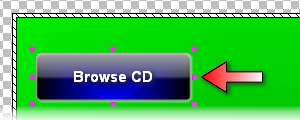
- Select an object that will open the contents of your disk.
- Go to the Actions section in the Properties Panel and click the Add action button.
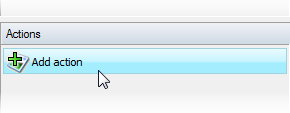
This will open up the "Event | Action" window.
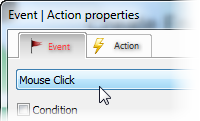
- Select the Mouse Click event
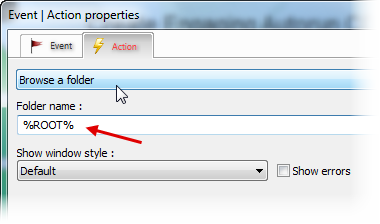
- Select the Browse a folder action. Use the %ROOT% variable in the Folder name field.
Follow the steps below :
- Select the Web Browser tool on the Tools panel
 .
.
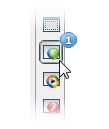
- Place the Web Browser object on the AutoPlay Menu Designer's page where you want to display a PDF document
 .
.
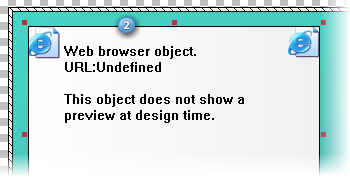
- The "open file" dialog will be shown. Select your pdf document and press Open.
- Click the Preview project button on the toolbar
 .
.
- You will see your PDF document inside the Autorun Menu window.
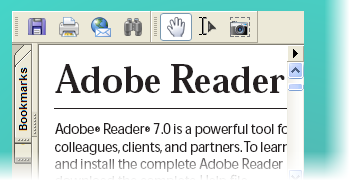
Follow the steps below :
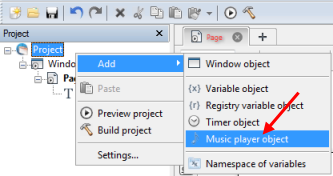
- Right click a "project" object in the Project panel and select the "Add -> Music player object" item.
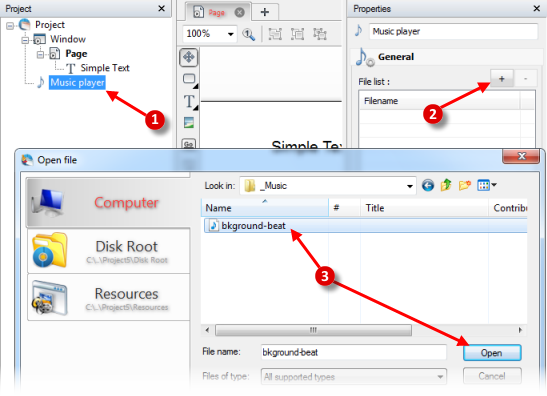
- Click the Music player object in the Project panel
 , click the "+" button to add a music file
  , and select the music file from the disk
  .
.
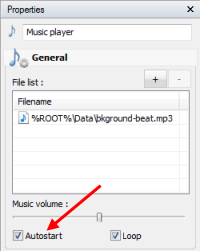
- In the Properties panel turn on the Autostart checkbox to start music when your project is started.
Follow the steps below :
- Click the Window object in the Project panel.
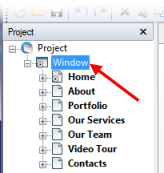
- In the Properties panel turn on the "Show window title" checkbox and use the %CurPageName% variable as a window name.
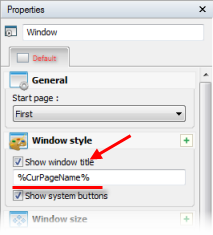
- As a result you will see the current page name in the window title.
